Bake lighting
Lightmap baking precomputes the light and shadows falling on static objects and saves them as images (lightmaps). Because they aren't calculated every frame during the game, the game runs lighter, and you can use soft shadows that would be too expensive in real time.
The test on this page was done once on 2026-10-29 in the oasisw.ai editor (version shown as OasisW 7e2aa65) with the Light and Plane of a new scene.
Fields used for baking
| Where | Field | Default | Meaning |
|---|---|---|---|
| Light (LIGHT) | Bake Lightmap | Off | Whether to bake this light into the lightmap |
| Bake Direction, Bake Samples, Bake Area | On, 1, 0 | Store light direction, number of samples, shadow softness | |
| Object (RENDER) | Lightmapped | Off | Whether to apply the lightmap to this object |
| Lightmap Size, Lightmap Size Multiplier | 64, 1 | Appear when Lightmapped is on. Lightmap resolution and multiplier for this object | |
| SETTINGS LIGHTMAPPING | Size Multiplier | 16 | Lightmap resolution multiplier |
| Max Resolution | 2048 | Maximum size of a single lightmap | |
| Mode | Color and Direction | Choose Color Only to bake color only | |
| SETTINGS EDITOR | Lightmapper Auto Bake | On | Rebake automatically whenever something changes |
Do it in the editor
- Select the light to bake and turn on Bake Lightmap in LIGHT.
- Select the static objects that receive the light (floor, walls) and turn on Lightmapped in RENDER.
- Click the light bulb icon in the left toolbar. Hovering over it shows
Bake Lightmaps (Ctrl+B). In our test, there was no visible change or progress indicator in the editor after clicking it. - Check the result with ▶ Launch.
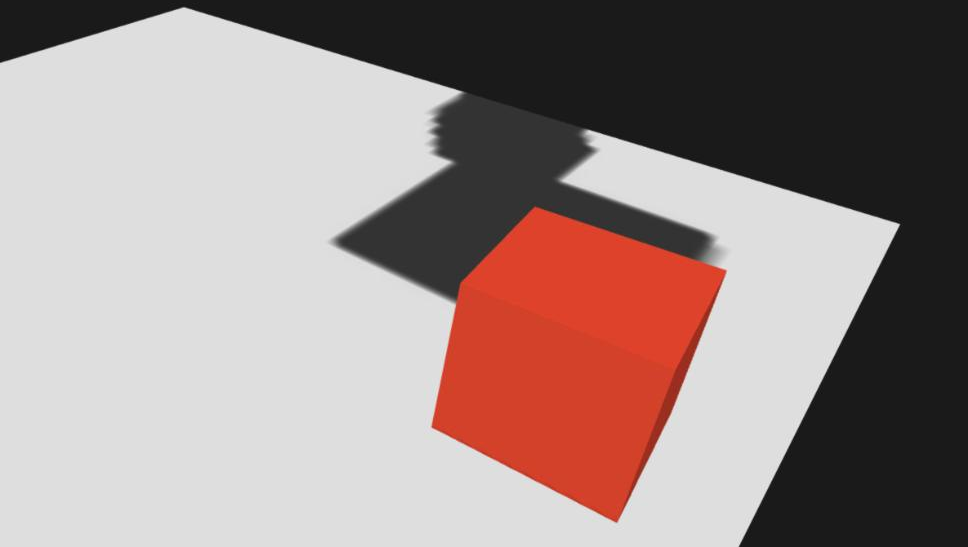
In our test, a baked shadow appeared on the floor after Launch. The shadow was baked from the box's starting position (height 4, in the air), so it was stretched long, and its edges were jagged because of Lightmap Size 64. After the box fell and landed on the floor, the shadow stayed where it was, and the box itself cast no real-time shadow on the floor. This is because Affect Lightmapped is off on this light, so it gives no real-time light to the baked floor.
Let the AI do it
Baking lighting just means turning on a few fields, so it's quick to do by hand. We have not tested letting the AI do it. Pending Test Let the AI do it