Receive collision events
To make something happen when objects collide or something enters an area, receive collision events in a script. This page builds two things: a box that changes color when it hits the floor (collisionstart), and a zone that disappears when a box passes into it (triggerenter).
The tests on this page were done on 2026-10-29 in the oasisw.ai editor (version shown as OasisW 7e2aa65, macOS Chrome) using the scene from Add collision. Results were checked by running the game with Launch twice and reading the browser Console log and script values.
Collisions and triggers
| Collision | Trigger | |
|---|---|---|
| Receiving entity | Collision + Rigid Body | Collision only (no Rigid Body) |
| Can objects pass through? | Blocked | Pass through |
| Event received | collisionstart, collisionend, contact | triggerenter, triggerleave |
| Use for | Hitting the floor, hitting a wall, hitting an enemy | Finish lines, item pickups, trap zones |
An entity used as a trigger deliberately creates the state you saw in Add collision, where "objects pass through because there's no Rigid Body."
In a test on 2026-10-30 (1 run), we dropped Box (Dynamic) through the trigger Zone to see which entity each event reaches.
| Event | When it fires | Entities that received it |
|---|---|---|
collisionstart | When contact starts. Fires again if the object bounces off and touches again | Both Box and Plane (both have a Rigid Body) |
collisionend | When two touching objects separate | Both |
contact | Continuously while touching. It fired 332 times in about 4.6 seconds | Both |
triggerenter | When something enters the trigger area | The trigger (Zone) only |
triggerleave | When something leaves the trigger area | The trigger (Zone) only |
The Box that passed through the trigger received no trigger events. Handle trigger reactions in a script attached to the trigger entity. When we launched the resting Box upward with applyImpulse(0, 6, 0), the events came in this order: collisionend → Zone's triggerenter and triggerleave → collisionstart again. contact fires almost every frame, so use collisionstart for things like scoring or sounds. Pending Test whether events fire when an entity without a Rigid Body enters a trigger
Before you start
- Finish Add collision so you have a scene where the
Box(Dynamic) falls onto thePlane(Static) and stops. On this page, theBoxfalls fromPosition3, 4, 0. - To create and attach a script, see Create and attach a new script.
Do it in the editor
1. Change color on hit (collisionstart)
- In ASSETS, click + → Script to create a
hitColorscript. - Enter the code below and save. You can also edit it directly in the CODE section on the right and click Save (see Code editor).
- Add a Script component to
Boxand attachhitColorwith + ADD SCRIPT.
var HitColor = ow.createScript('hitColor');

// Color to switch to on hit
HitColor.attributes.add('hitColor', { type: 'rgb', default: [1, 0.3, 0.2], description: 'Color on hit' });

HitColor.prototype.initialize = function () {
    this.hits = 0;
    // Called once when it starts touching another object
    this.entity.collision.on('collisionstart', this.onHit, this);
};

HitColor.prototype.onHit = function (result) {
    this.hits += 1;
    console.log('Hit: ' + result.other.name + ' (#' + this.hits + ')');
    var material = new ow.StandardMaterial();
    material.diffuse = this.hitColor;
    material.update();
    this.entity.render.meshInstances[0].material = material;
};| Line | Meaning |
|---|---|
attributes.add('hitColor', { type: 'rgb', … }) | Creates a color field you can pick in the editor |
collision.on('collisionstart', this.onHit, this) | Calls onHit each time a collision starts |
result.other | The other entity in the collision. Read its name with .name |
new ow.StandardMaterial() … material = material | Creates a new material and applies it to the entity's mesh |
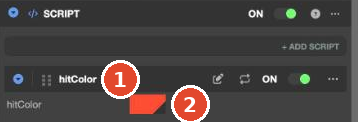
Once attached, a color field filled with the code's default (red) appears below the hitColor row.
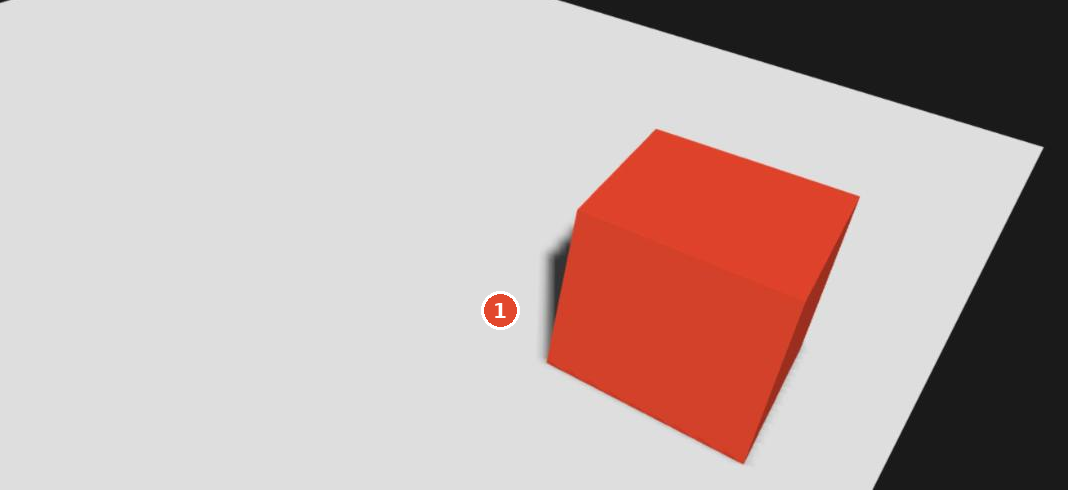
When you Launch, the box turns red the moment it hits the floor.
2. See that the event fires multiple times
In our tests, collisionstart fired 3 times each time the box fell (in both runs). Each time the box bounces slightly off the floor and lands again, it counts as a new "collision start." This appears to happen because the Rigid Body's Restitution (bounce) defaults to 0.5.
When an action such as adding score or playing a sound must not happen more than once, use once instead of on. It is called only the first time.
this.entity.collision.once('collisionstart', this.onHit, this);In our tests, switching to once brought the call count down to 1 (in both runs).
3. Make a zone that reacts when entered (triggerenter)
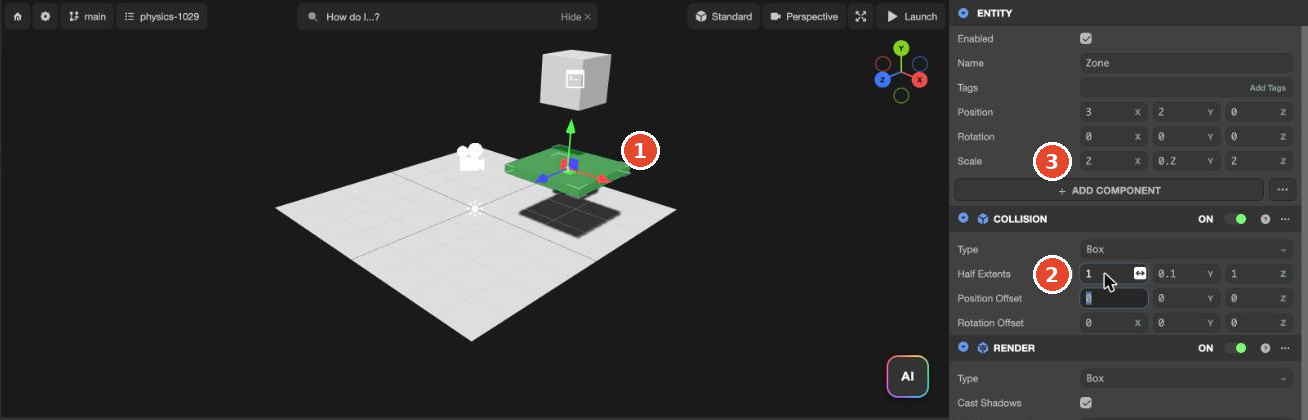
- In HIERARCHY, click + → 3D → Box to create an entity and rename it
Zone. - Set
Positionto3, 2, 0andScaleto2, 0.2, 2. This creates a thin slab where the fallingBoxpasses. - Add only Collision and change Half Extents to
1, 0.1, 1. The collision area doesn't grow with Scale, so enter half the Scale yourself. Don't add a Rigid Body.
- Create a
zoneAlertscript, enter the code below, and attach it toZone.
var ZoneAlert = ow.createScript('zoneAlert');

ZoneAlert.prototype.initialize = function () {
    this.entered = 0;
    // Called when an entity with a rigid body enters this area
    this.entity.collision.on('triggerenter', this.onEnter, this);
};

ZoneAlert.prototype.onEnter = function (other) {
    this.entered += 1;
    console.log('Entered zone: ' + other.name);
    // Hide the zone
    this.entity.render.enabled = false;
};
Unlike collisionstart, triggerenter passes the other entity directly (other, not result.other).
When you Launch, the box passes straight through Zone, and Zone disappears at that moment. The box hits the floor, turns red and stops. In our tests, triggerenter fired once (in both runs).
View the log
console.log output from scripts doesn't appear on the game screen. In the Launch tab, open the browser's developer tools (Windows F12, Mac Cmd+Option+I) and look at the Console tab. In our tests, these lines were printed in order:
Entered zone: Box
Hit: Plane (#1)
Hit: Plane (#2)
Hit: Plane (#3)
The script file URL and line number appear to the right of each log line. The game's log did not appear in CONSOLE at the bottom of the editor. Across 4 Launches, CONSOLE showed only the single first line printed when the editor opened.
Let the AI do it
A request like "do something on hit" means the AI creates and attaches a script. State which entity touches what, and what happens how many times. If you don't say "only once," it may happen multiple times as shown above.
When the Box first touches the Plane, turn the Box red. From the second time on, nothing should happen. Don't touch anything else.Pending Send the prompt above 3 times on the current version and record the results (script created, on vs. once)
Check the result
- Launch and check that what you want happens at the moment of impact.
- Check in the browser Console how many times the event fired. If an action that should happen once happens several times, use
onceor a condition. - For a trigger zone, check both that objects pass through and that the event fires when they enter.
Troubleshooting
| Symptom | Cause | Fix |
|---|---|---|
| Nothing happens on impact | The script isn't attached, or physics isn't working | Check that the script row is in the entity's SCRIPT, and that the Ammo folder and Rigid Body exist (Add collision) |
| Something that should happen once happens several times | collisionstart fires again on each bounce | Change on to once |
triggerenter doesn't fire when entering the zone | If the zone has a Rigid Body, it becomes a blocking object instead of a trigger | Remove the zone's Rigid Body and keep only Collision |
triggerenter doesn't fire in the script on the object that entered | Trigger events reach only the trigger entity | Attach the script to the trigger entity (the zone) and handle the event there |
| Only part of the zone reacts | The Collision area doesn't grow with Scale | Set Half Extents to half the visible size |
console.log output isn't visible anywhere | It doesn't appear on the game screen or in the editor's CONSOLE | Open the Console in the browser developer tools of the Launch tab |