Read the last line and the auto-check
When AI GAME BUILDER finishes a task, it leaves the auto-check result as one line. This page explains what that line is the result of checking and what it can't check. The conclusion is simple: the last line tells you where to start looking, and you decide whether the work is done by running it yourself with Launch.
Two forms of the last line
When a task finishes, an auto-check line is added below the summary. When the result is applied to the scene, a 씬에 반영했습니다 · … (Applied to the scene · …) line appears, and the 중단 (Stop) button returns to 보내기 (Send). In 2 runs tested on 2026-10-29, the 씬에 반영했습니다 line was at the very end, with the auto-check line just above it. On this page, "the last line" means this auto-check line. It is usually one of these two.
| Last line | Meaning as stated by the AI |
|---|---|
✓ 자동 점검: 문제 없음 (✓ Auto-check: no issues) | The AI's check didn't find any remaining issues. |
자동 점검: 문제 N건 남음 (Auto-check: N issues remaining) | The AI itself reported N issues it couldn't fix. In the runs we observed, the remaining issues were listed as lines in English. |
Sometimes there's no last line. In a test on 2026-10-26, 2 fix prompts ended with a line like 씬에 반영했습니다 · 스크립트 1개 수정 (Applied to scene · 1 script modified), with no summary or auto-check line, and when we ran the game the requested defects were fixed. Here too, judge by running it yourself.
During a task, a step summary and ✓ 자동 점검: 문제 없음 are also added each time a step finishes. If you see 자동 점검: 문제 1건 — 고치는 중 (Auto-check: 1 issue — fixing), the AI is fixing an issue it found itself. How to read step summaries is in Read the plan and work steps.
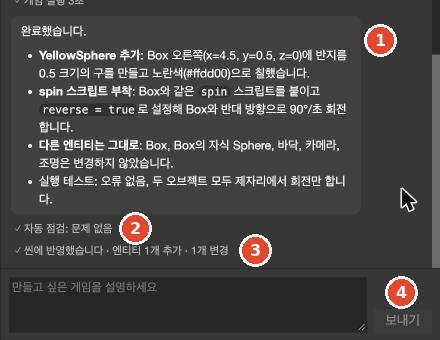
Also read the counts in the 씬에 반영했습니다 line. If the count is higher than what you asked for, there were changes you didn't request. The figure above shows the result of a prompt asking to "create one yellow sphere and attach the spin script": 엔티티 1개 추가 · 1개 변경 (1 entity added · 1 changed). Pending Verify what the "1 changed" was in this case On the same day, a prompt asking to "create one more green box" ended with 엔티티 4개 추가 · 6개 변경 (4 entities added · 6 changed). Examples are in Check what the AI changed.
What the auto-check sees and what it doesn't
The AI runs the game itself during a task. Meanwhile, a small screen and AI가 게임 실행 확인 중… (AI is checking the game run…) appear at the bottom left of the editor, and a line like ✓ 게임 실행 2.5초 (Game run 2.5 s) is added to the work log. In testing, each run lasted 1.5 to 3 seconds.
In a few seconds, it can see roughly whether the game starts without errors and whether entities move in response to key input. A few seconds is not enough to check the following:
- Whether the end condition works when the goal is fully achieved
- Whether the starting state is correct (no win message shown right at start)
- Whether the camera keeps following the player
- Whether on-screen text is readable (clipping, missing characters, colors close to the background)
So read 문제 없음 as "the AI found no errors within what it ran." It does not mean "the game works as requested."
Cases with "no issues" but defects remaining
These cases were observed while building a first game and adding rules with the same star-collecting prompt.
| Task | Last line | Result when we ran it |
|---|---|---|
| First build (1 of 7 runs) | 문제 없음 | 3 defects. You win! was shown right at start, the count didn't go up when stars were eaten, and the camera didn't follow the ball. |
| Adding a rule: lives (first run) | 문제 없음 | The AI wrote that it had "verified losing lives and game over." In fact, the game over message was shown right at start, and dropping the ball didn't reduce lives. |
| Adding a rule: lives (second run) | 문제 없음 | In under a minute, the summary said "this request couldn't be finished all the way." The scene didn't change. Since nothing changed, there was nothing for the check to flag. |
| Different genre (dodging game), first build | 문제 없음 | The health and remaining-time displays were frozen. |
| After continuing a 2026-10-26 first build | 문제 없음 | A win message was shown right at start, and Stars: 0 / 10 didn't go up when stars were eaten. |
The AI itself explained the cause in the first run. It didn't restore the starting lives (1) it had temporarily reduced for testing, and it didn't correctly link the lives text entity. This shows that even what the AI reports as "verified" can be wrong.
As in the third row, the summary and the last line can disagree. Don't read only the last line; also read the summary just above it. If the summary contains any of these expressions, the work is unfinished regardless of the last line.
- "couldn't finish"
- "remaining work"
- "the actual fix hasn't been applied yet"
Cases with "N issues remaining" that worked correctly
Conversely, 문제 N건 남음 doesn't mean the game is broken.
| Task | Last line | Result when we ran it |
|---|---|---|
| First build (1 of 7 runs) | 문제 2건 남음 (2 issues remaining) | The rules worked to the end. However, the win message was clipped on both sides of the screen and one character appeared to be missing. |
| Fix prompt with 3 numbered items (new project) | 문제 4건 남음 | All 3 requested items were fixed. 3 of the 4 were … but no entity has it attached: warnings that script files no longer used after the fix were left behind. They had no effect on the game. |
| Adding a rule: lives (both runs, after continuing) | 문제 1건 남음 | Lives went 3 → 2 → 1 → 0 and game over appeared. The 1 remaining issue was a display problem such as "text is hard to see" or "the ball is small." |
Of course, some runs with N건 남음 really were broken. 2 of the 7 first-build runs ended with 문제 1건 남음 and 문제 11건 남음, and either showed the win message right at start or had no win message at all. 1 run built in a new project also had 문제 1건 남음 and the same defect.
The issues listed as remaining may also differ from the actual defects. One run in a test on 2026-10-26 ended with 문제 2건 남음, listing "two scripts share the same text field" and "the stars are too small to see." When we ran it, the stars were indeed small, but there was also an unlisted defect: "win message right at start." On the same day, one fix prompt ended with 문제 4건 남음 (4 unused scripts), but the 2 requested defects were unchanged and a new defect appeared.
When you see N건 남음, first read the English lines below it to see what remains. Then run the game yourself to see whether it actually matters. How to continue unfinished work is in When the AI stalls, stops short, or loops.
Game-run limit
There is a limit to how many times the AI can run the game within one prompt. When it uses up the limit, the AI writes a sentence like run_game 호출 한도(9회)에 걸려 마지막 동작 확인을 마무리하지 못했다 (hit the run_game call limit (9) and couldn't finish the final behavior check) and ends the task.
- This sentence appeared in 3 of 7 first-build runs.
- The recorded limit was 9 in most cases and 6 once. The limit is not a fixed value (confirmed by the development team).
- In runs that hit the limit, the last line could be either
문제 없음or문제 N건 남음.
This sentence doesn't mean the task stalled. The AI is reporting that it couldn't do the final check. In this case, run the game yourself before continuing the task.
Always check it yourself with Launch
Whatever the last line says, the way to check is the same. Read the last line and the summary just above it, then play the game from start to finish with Launch. Check not only the new rules but also the features that were already there, because there have been cases where the AI changed things it wasn't asked to. The exact steps are in "Check the result" in Run with Launch.
In testing, 3 of the 5 initial builds passed with no defects from the start. On 2026-10-26, all 3 runs built in 3 new projects with the prompt from Make your first game had defects at first. Adding one rule needed two or three prompts in both runs. Running the game yourself to find defects is not exception handling; it's part of the normal workflow.
How to fix the defects you find is in Send fix prompts.